7 Best Bike Computers with Maps for Road and Gravel Riders (2026)
Compare 7 bike computers with maps and turn-by-turn navigation. See which fits road, gravel and touring riders, with clear pros, cons and buying tips.
 By Ethan Brooks
Updated November 25, 2026
 By Ethan Brooks
Updated November 2026
Choosing a bike computer with maps comes down to a few practical questions: how clear the screen is in sunlight, whether the routes you plan will reload cleanly when you miss a turn, how long the battery lasts on a long ride, and whether the unit pairs easily with your sensors and phone. This guide compares seven models sold on Amazon US that combine a color display with map-based navigation. The selection method was research-based, looking at manufacturer specifications, brand track record and patterns in owner feedback. No unit here was tested by us, so treat the details as a starting point and confirm them against the current listing before you buy.
Our top picks at a glance
- 1TOP CHOICEBest overalliGPSPORT BSC500 GPS Bike Computer, 3.3'' Touch Screen MAP Voice NavigationView on Amazon
- 2
 TOP CHOICEBest for route reroutingGEOID CC700 Pro 2.8" Color Touchscreen GPS Bike/Cycling ComputerView on Amazon
- 3
 TOP CHOICEBest for compact handlebar mountsiGPSPORT BSC200 Pro GPS Bike Computer, 3.0'' Route Navigation ReroutingView on Amazon
- 4
 Best budget pickGEOID CC600 Color Screen Bike/Cycling Computer WirelessView on Amazon
- 5
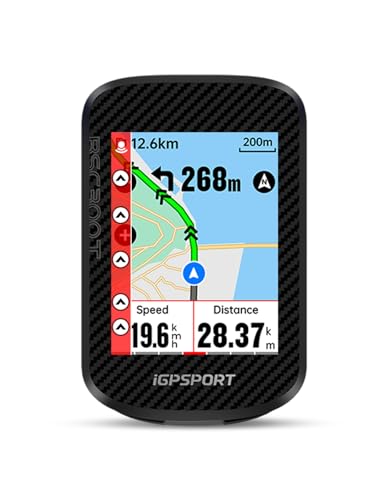 Best for off-course alertsiGPSPORT BSC300T GPS Bike Computer, Smart Map Navigation 2.4'' Touch ScreenView on Amazon
- 6
 Best for long battery lifeiGPSPORT BSC200S GPS Bike Computer, Route Navigation Long Battery LifeView on Amazon
- 7
 Best for indoor training crossoverGEOID CC700 2.8" Color Screen Bike/Cycling Computer WirelessView on Amazon
Our Top Picks
Quick Comparison
| Product | Best for | Key feature |
|---|---|---|
| iGPSPORT BSC500 GPS Bike Computer | Riders who want map navigation plus training features | 3.3-inch touch screen with map voice navigation |
| GEOID CC700 Pro 2.8″ Color Touchscreen GPS Bike Computer | Riders who often change routes mid-ride | Re-route planning and WiFi auto-sync |
| iGPSPORT BSC200 Pro GPS Bike Computer | Riders who want a compact display | 3.0-inch screen with rerouting and voice guidance |
| GEOID CC600 Color Screen Bike Computer | Budget-minded riders | Route navigation with rerouting and fast GPS fix |
| iGPSPORT BSC300T GPS Bike Computer | Riders who want warnings when they leave a route | Off-course warning and e-bike mode |
| iGPSPORT BSC200S GPS Bike Computer | Multi-day rides and touring | Long battery life with sensor connectivity |
| GEOID CC700 2.8″ Color Screen Bike Computer | Riders who also train indoors | Free indoor training support with fast GPS positioning |
iGPSPORT BSC500 GPS Bike Computer, 3.3” Touch Screen MAP Voice Navigation
iGPSPORT BSC500 GPS Bike Computer, 3.3'' Touch Screen MAP Voice Navigation | Climb Training Ebike Function Yaw Replan Group Ride Radar Warning Sync with Strava Bluetooth ANT+ Wireless Bicycle Computer
Best for: Riders who want map navigation plus training features in one unit
This model suits road and gravel riders who follow planned routes and also want structured training data. The larger touch screen makes map reading easier at a glance, and the voice navigation keeps eyes on the road.
Key specs
- 3.3-inch touch screen
- Map voice navigation
- Bluetooth and ANT+ connectivity
- Strava sync
Pros
- Large touch display for map reading
- Voice guidance reduces screen checks
- Broad sensor and app compatibility
Cons
- Larger body may not suit minimal bar setups
- Feature depth can take time to learn
Bottom line: A strong choice for riders who want the most complete navigation and training package from this list.
View on AmazonGEOID CC700 Pro 2.8″ Color Touchscreen GPS Bike/Cycling Computer
GEOID CC700 Pro 2.8" Color Touchscreen GPS Bike/Cycling Computer, Map Navigation with Re-Route Planning, WiFi Auto-Sync, ANT+/Bluetooth, Message Notification, IPX7 Waterproof, Free Indoor Training
Best for: Riders who often change routes mid-ride
Riders who explore unfamiliar roads or take detours will value the re-route planning. The WiFi auto-sync also helps keep routes and ride data moving without manual transfers.
Key specs
- 2.8-inch color touchscreen
- Map navigation with re-route planning
- WiFi auto-sync and ANT+/Bluetooth
- IPX7 waterproof rating
Pros
- Re-route planning handles detours well
- WiFi auto-sync reduces manual steps
- Waterproof rating suits wet rides
Cons
- Smaller screen than the top pick
- Touch response varies with gloves
Bottom line: Best for riders who want flexible rerouting with automatic data sync.
View on AmazoniGPSPORT BSC200 Pro GPS Bike Computer, 3.0” Route Navigation Rerouting
iGPSPORT BSC200 Pro GPS Bike Computer, 3.0'' Route Navigation Rerouting | 3" Color Touchscreen | Bluetooth | Route Navigation | Voice Guidance | 25H Battery | 100+ Cycling Data | Waterproof
Best for: Riders who want a compact display
This unit fits riders who prefer a smaller footprint on the handlebar while still getting route navigation and voice guidance.
Key specs
- 3.0-inch color touchscreen
- Route navigation with rerouting
- Voice guidance
- Bluetooth connectivity
Pros
- Compact size for crowded bar setups
- Rerouting and voice guidance included
- Waterproof build for mixed weather
Cons
- Smaller screen limits data fields shown at once
- Fewer training features than the premium model
Bottom line: A practical middle option for riders who want navigation without a large unit.
View on AmazonGEOID CC600 Color Screen Bike/Cycling Computer Wireless
GEOID CC600 Color Screen Bike/Cycling Computer Wireless – Route Navigation with Reroute Planing, WiFi & Bluetooth, Fast 5s GPS Positioning, Free Indoor Training
Best for: Budget-minded riders
Riders who want map-based route guidance without a premium price tier will find the CC600 a sensible fit, especially for weekend and commuter routes.
Key specs
- Color screen with route navigation
- Rerouting planning
- WiFi and Bluetooth
- Fast GPS positioning
Pros
- Covers core navigation needs
- Quick GPS lock reported by many owners
- Indoor training support
Cons
- Fewer advanced metrics than premium units
- Screen detail is more modest
Bottom line: Ideal for riders who want core map navigation and are comfortable with a simpler feature set.
View on AmazoniGPSPORT BSC300T GPS Bike Computer, Smart Map Navigation 2.4” Touch Screen
iGPSPORT BSC300T GPS Bike Computer, Smart Map Navigation 2.4'' Touch Screen | Off Course Warning Ebike Mode Connect with Radar Light Sync with Strava Bluetooth ANT+ Wireless Bicycle Computer
Best for: Riders who want warnings when they leave a route
The off-course warning helps riders who depend on a set path, such as bikepacking or unfamiliar regional routes, catch wrong turns early.
Key specs
- 2.4-inch touch screen
- Smart map navigation
- Off-course warning
- E-bike mode and ANT+/Bluetooth
Pros
- Off-course alerts prevent long detours
- E-bike mode broadens use
- Strava and sensor compatibility
Cons
- Smaller screen than the BSC500
- Alerts depend on accurate route files
Bottom line: A good fit for riders who follow loaded routes and want early warning when they stray.
View on AmazoniGPSPORT BSC200S GPS Bike Computer, Route Navigation Long Battery Life
iGPSPORT BSC200S GPS Bike Computer, Route Navigation Long Battery Life | Easy to Read Connect with Sensors Sync with Strava Bluetooth ANT+ Wireless Bicycle Computer
Best for: Multi-day rides and touring
Touring riders who go long stretches between charges will appreciate the battery-focused design and straightforward readability.
Key specs
- Route navigation
- Long battery life
- Sensor connectivity via Bluetooth and ANT+
- Strava sync
Pros
- Long battery life suits multi-day trips
- Easy-to-read display
- Works with common sensors
Cons
- Fewer premium features than higher-end models
- Battery figures depend on settings and temperature
Bottom line: Best for riders whose top priority is running all day without recharging.
View on AmazonGEOID CC700 2.8″ Color Screen Bike/Cycling Computer Wireless
GEOID CC700 2.8" Color Screen Bike/Cycling Computer Wireless – Route Navigation with Re-Route Planing, WiFi Auto-Sync, ANT+/Bluetooth, Fast 5s GPS Positioning, Free Indoor Training
Best for: Riders who also train indoors
This model suits riders who split time between outdoor routes and indoor sessions, since the free indoor training support keeps one device in use year-round.
Key specs
- 2.8-inch color screen
- Route navigation with re-route planning
- Fast 5-second GPS positioning
- ANT+/Bluetooth and WiFi
Pros
- Indoor training support adds year-round use
- Fast GPS positioning
- Re-route planning on outdoor rides
Cons
- Screen is smaller than premium options
- Indoor features may need app setup
Bottom line: Good for riders who want one unit for both road navigation and indoor workouts.
View on AmazonBuying Guide
Screen size and readability
Map navigation depends on how much detail you can read at a glance. Larger screens around 3 inches or more make street labels easier to read, while screens near 2.4 to 2.8 inches keep the unit smaller on the handlebar. Check how the display handles direct sun, since many riders find glare is the biggest readability problem.
Good picks for this: iGPSPORT BSC500 GPS Bike Computer, GEOID CC700 Pro 2.8″ Color Touchscreen GPS Bike Computer
Map and routing features
Look for turn-by-turn voice prompts, the ability to import GPX or similar route files, and rerouting when you leave the planned line. Off-course warnings help riders on long routes, and rerouting matters most when you take unplanned turns.
Good picks for this: GEOID CC700 Pro 2.8″ Color Touchscreen GPS Bike Computer, iGPSPORT BSC300T GPS Bike Computer
Battery life
Manufacturers usually list battery life under specific conditions, often with GPS and screen settings at moderate levels. Real-world life drops with bright screens, cold temperatures and constant map redraws. If you ride more than four or five hours at a stretch, prioritize models with long rated battery life and carry a power bank as a backup.
Good picks for this: iGPSPORT BSC200S GPS Bike Computer, iGPSPORT BSC200 Pro GPS Bike Computer
Mounting and size
Measure your handlebar and check whether the mount fits round or oversized bars, and whether you need space for a light or a phone. Compact units leave room for a headlight and accessories, while larger units give more map area. Confirm the mount type matches your bike before buying.
Good picks for this: iGPSPORT BSC200 Pro GPS Bike Computer, GEOID CC600 Color Screen Bike/Cycling Computer Wireless
Sensor and app compatibility
Most riders pair a heart rate strap, cadence sensor or power meter. Confirm the computer supports ANT+ and Bluetooth for your sensors, and check that it syncs with the apps you already use. Compatibility is the most common source of frustration when a new unit arrives.
Good picks for this: iGPSPORT BSC500 GPS Bike Computer, GEOID CC700 2.8″ Color Screen Bike/Cycling Computer Wireless
Weather resistance
Rain, road spray and dust can shorten a unit’s life. Look for a stated waterproof rating, such as IPX7, which indicates submersion protection under controlled conditions. Waterproof ratings are a manufacturer claim, so keep the unit’s seals clean and avoid high-pressure washing.
Good picks for this: GEOID CC700 Pro 2.8″ Color Touchscreen GPS Bike Computer, iGPSPORT BSC200 Pro GPS Bike Computer
Budget and feature trade-offs
Premium models add larger screens, voice guidance and extra training metrics. Budget units cover core navigation well. Decide which features you will actually use before paying for the rest, because extra functions only help if they fit how you ride.
Good picks for this: GEOID CC600 Color Screen Bike/Cycling Computer Wireless, iGPSPORT BSC500 GPS Bike Computer
FAQ
What is a bike computer with maps?
It is a cycling computer with a color display that shows your position on a map and can guide you along a planned route. Many models also record speed, distance, heart rate and cadence.
Do I need a map bike computer if I use my phone?
Phone apps work for simple navigation, but a dedicated unit uses less of your phone’s battery, stays mounted in rain and avoids screen glare issues. Many riders use both, with the phone as a backup.
How do I load routes onto a bike computer?
Most units import GPX files from a route-planning website or app, either through a USB cable, a companion app or WiFi sync. Check the manufacturer’s manual for the exact steps for your model.
What does rerouting mean?
Rerouting recalculates your path when you leave the planned route. It can be automatic or prompt you to confirm. Features vary by model, so verify it in the product details before buying.
Will a map bike computer drain my battery quickly?
Map use and bright screens consume more power than basic data screens. Rated battery life assumes moderate settings. Lower brightness and turn off unused alerts to extend ride time.
Do these units work with heart rate straps and cadence sensors?
Most listed models support ANT+ and Bluetooth sensors. Confirm the specific sensor types you own are supported before you buy, and pair them before a long ride.
Are map bike computers waterproof?
Many include a waterproof rating, but ratings describe specific test conditions. Rinse off mud and dust after wet rides and avoid pressure washing the unit.
Conclusion
For riders who want the most complete package, the iGPSPORT BSC500 stands out for its large touch display and voice navigation. Riders who change routes often should look at the GEOID CC700 Pro for re-route planning and WiFi sync. Compact handlebar setups suit the iGPSPORT BSC200 Pro, while budget-minded riders will find the GEOID CC600 covers core needs. Those who fear wrong turns on loaded routes should consider the BSC300T’s off-course warnings, and touring riders will value the BSC200S’s battery life. Anyone who also trains indoors may prefer the GEOID CC700 2.8″. Match the unit to your most frequent ride type, and confirm sensor compatibility before purchase.
Sources
- Guidance on safe cycling practices and route planning for riders
- Background on how GPS positioning works and what affects accuracy (gps.gov)
- Consumer safety information on bicycle equipment and accessories (cpsc.gov)
Before you buy: helpful guides
Related reading
- iGPSport Bike Computer Review (2026): Which Model Should You Choose?
- What Is Cadence on a Bike Computer? A Beginner's Guide
- What Bike Computer Does Jonas Vingegaard Use? Garmin vs Wahoo Compared
About Ethan Brooks
Ethan Brooks is part of our editorial team and reviews and edits our bike helmets & cycling safety guides, checking product details against manufacturer specifications and owner feedback.
About the author
Ethan Brooks writes reviews and buying guides for Bike Helmet Snow.